In development for iPhone — not yet on the App Store Personal analytics for iPhone

Years of your own records, finally in the same room.

Renovatio reads the records you already keep — health, habits, spending, investments, calendar, places and photos — and shows any day, week, month or year with all of them side by side. It computes on your phone and keeps everything there.

It is not a tracker. Nothing is entered twice and nothing is estimated. Every figure comes from a record that already existed, and the app's job is the join, the arithmetic and the honesty.

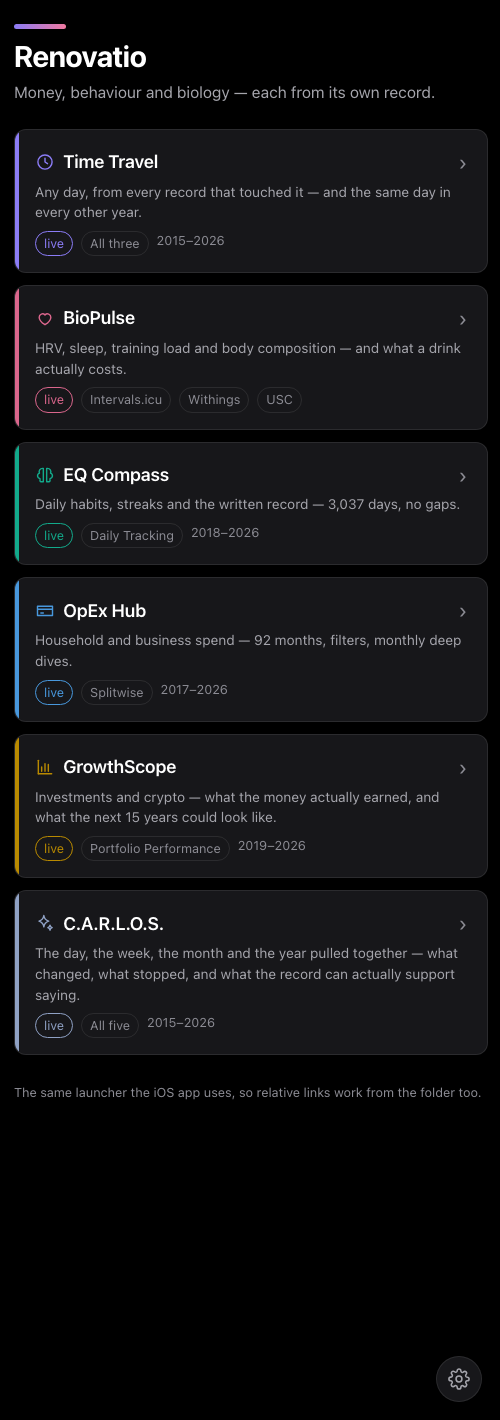
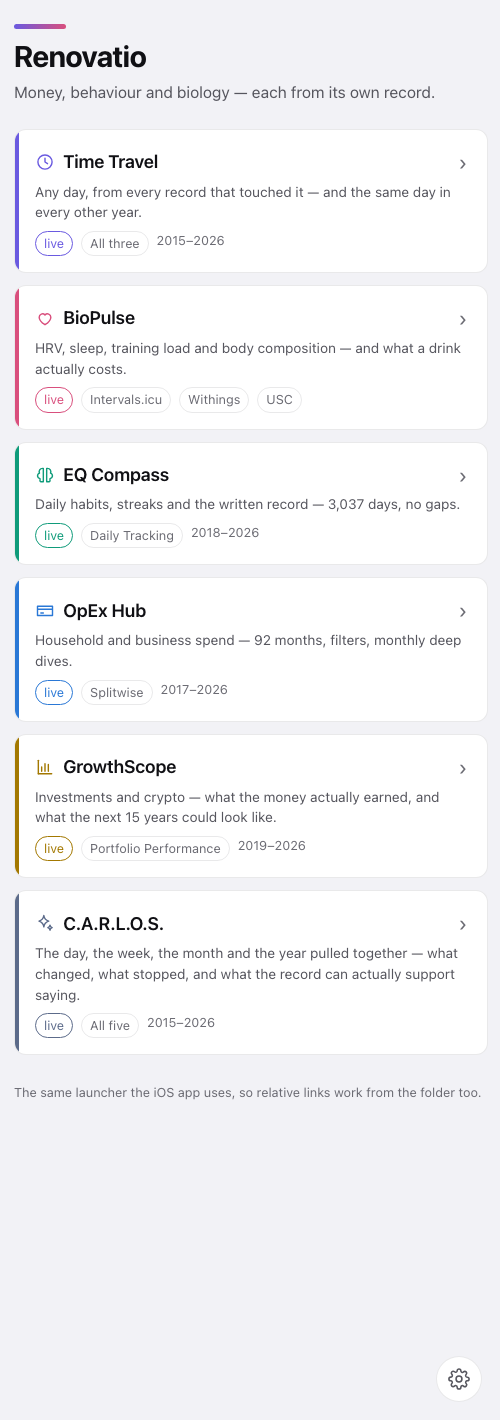
The Renovatio launcher: six module cards — Time Travel, BioPulse, EQ Compass, OpEx Hub, GrowthScope and C.A.R.L.O.S. — each with a one-line description, its sources and the years it covers. The Renovatio launcher: six module cards — Time Travel, BioPulse, EQ Compass, OpEx Hub, GrowthScope and C.A.R.L.O.S. — each with a one-line description, its sources and the years it covers.
C.A.R.L.O.S.

Ask the record a question in plain words

C.A.R.L.O.S. answers from the whole record at once: money, body, habits, trips and the diary. A script computes the answer; Apple's on-device model only puts it into a sentence, and every number in that sentence is checked against the computation before it is shown. One it cannot account for, and the sentence is not shown.

  • How much went on coffee last month?
  • When did I last run more than 10 km?
  • What is my heart-rate recovery after a ride?
  • Which city did I visit most?
  • How does 2026 compare with 2025?
  • Which weekday do I spend the most?

It also writes a briefing for any day, week, month or year: what changed, what stopped, and what the record supports saying.

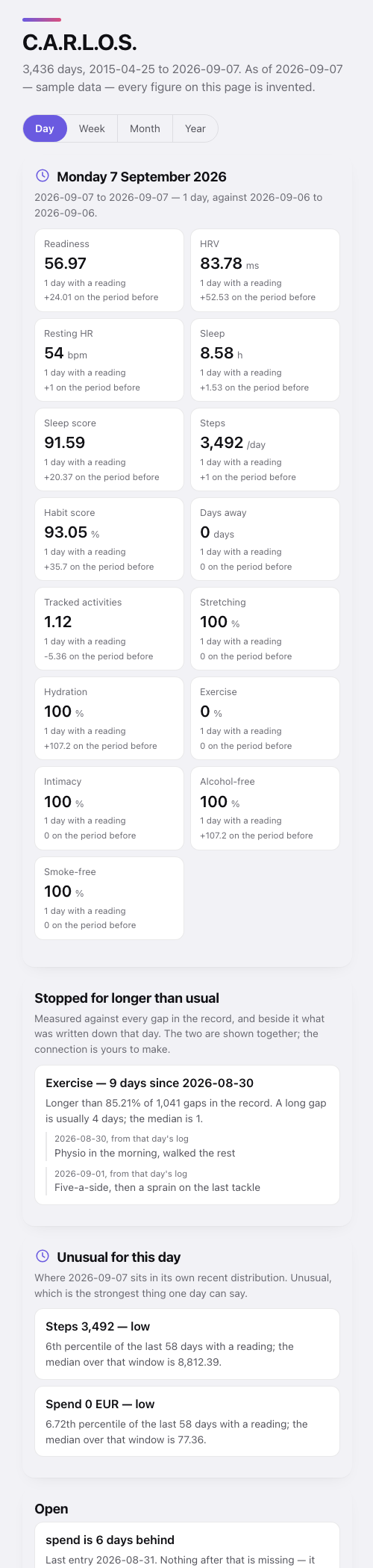
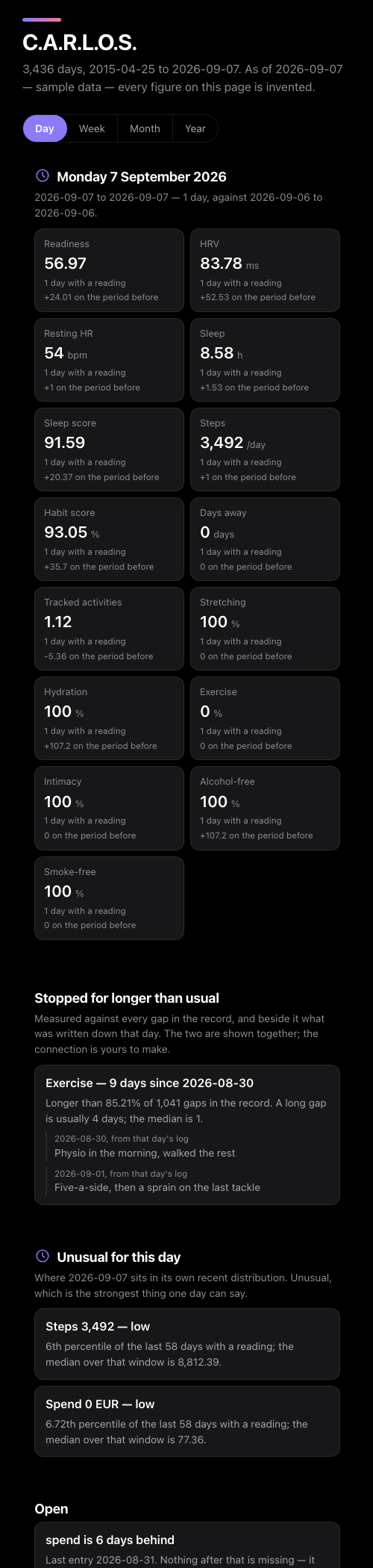
C.A.R.L.O.S. for one day of sample data: fifteen figure tiles such as readiness, HRV, sleep and steps, each with its day count and the change on the period before; an exercise gap set against 1,041 earlier gaps, beside that day's log entry; and two readings marked unusual for the day. C.A.R.L.O.S. for one day of sample data: fifteen figure tiles such as readiness, HRV, sleep and steps, each with its day count and the change on the period before; an exercise gap set against 1,041 earlier gaps, beside that day's log entry; and two readings marked unusual for the day.
Rendered from synthetic data. Every number is moved and every log entry replaced.
Six modules

What each one answers

Five read the joined record. The sixth reads the other five.

Time Travel

Operational

What was this day like, and the same day in every other year? A day replays on a street map — walks, rides, drives, trains, ferries and flights over the globe — with the hour, the weather and that day's photographs. Places the record infers are drawn differently from places it recorded.

Reads — what the other modules read, plus location history, calendars, photos and weather

BioPulse

Operational

How is the body doing? HRV, sleep, training load, body composition and heart-rate recovery after each workout, each ranked against your own history rather than an average person's.

Reads — health apps, wearables and training logs

EQ Compass

Operational

Six daily habits, their streaks, and the written record. Yesterday can be logged from a notification, and the day's note can be spoken instead of typed.

Reads — a habit tracker or a daily spreadsheet

OpEx Hub

Operational

Household and business spend by month and category. An expense can be added or edited on the phone, with its receipt read on the device, and each closed month comes with its own report.

Reads — expense logs, bank exports and receipts

GrowthScope

Operational

What the money actually earned, and what the next 15 years look like. On Saturday mornings, how equities and crypto moved over the week, and which holdings moved them.

Reads — portfolio and brokerage exports

C.A.R.L.O.S.

Synthesis

The day, week, month and year pulled together — what changed, what stopped, what the record supports saying — and the questions asked of all of it.
Reads — the other five modules
Built for iPhone

Where the record meets the rest of the phone

Widgets

Home Screen and Lock Screen widgets show the one thing from the record worth knowing now. The large one shows today's photographs from earlier years.

Notifications that cite the record

A morning note when a reading falls outside your own usual range, a weekly explainer on Saturdays, and a reminder on the day each recurring payment lands.

Siri and Shortcuts

Ask a question, add an expense, log yesterday, write a note for today or back everything up, by voice or from a Shortcut.

Photos, found by description

Photographs join the day they were taken and can be found by describing what is in them. The phone does the looking; the library stays where it is.

A day you can replay

Time Travel plays a day back on the map with its weather and photographs, and saves the replay as a video.

One "Back up now"

Everything that exists only on the phone — answers, notes, voice notes, waiting expenses — copied to a folder you choose, in one step.

What makes it unusual

Six rules it keeps

It refuses to state a number it cannot trace.

The model is handed findings a script already computed and is not allowed to add to them. A numeral it cannot account for, and the whole briefing is discarded, with the reason shown.

A missing measurement is shown as missing.

Not as a zero, not smoothed over. If spend has not been fetched for six days, the app says the spend record is six days behind, and does not draw a flat line.

It says how much it is standing on.

Every average carries the number of days that produced it, and every comparison the number on each side. A correlation across three hundred days and one across thirty never look alike.

The questions are fixed before it looks.

Sixteen of them, and all sixteen are reported — the ones that found nothing too. Confidence intervals are widened for the number of questions asked.

It shows the record, not a conclusion.

When a habit stops for longer than usual, the app shows the gap, how unusual it is against every other gap on record, and what was written that day. It does not say one caused the other.

Two sources that differ are not averaged.

Sleep scores from three vendors are each ranked against their own history, not blended into one number that none of them reported.

Privacy

Renovatio has no server

There is no Renovatio account and nothing for us to receive. The privacy page states each of these in full.

  • Written on the phone. Briefings and answers come from Apple's on-device model. Speech, photographs and receipts are read by the phone's own frameworks.
  • Apple Health is only read. Nothing is written to Health. Readings go to the app and to the data folder you choose, and nowhere else.
  • Network off by default. When switched on, it only reads, from a short list of sources compiled into the app, and every request is logged.
  • A folder you choose. Fresh data and backups go to one folder you pick. In iCloud Drive, iOS syncs it between your own devices.
  • No tracking. No analytics, advertising or crash reporting in the app.
The reference record, as of 2026-09-08

Built and tested on one real record

Every module is built against eleven years of one person's records before it reaches anyone else's. This is what that record joins.

4,140 days in the joined record
2015-04-25 → 2026-09-07
3,037 days of daily habit logs, unbroken
since 2018-05-16, zero gaps
92 months carrying categorised spend
since 2017-04-05
6 modules
five operational, one synthesis

What it reads

Records by kind, from the apps and files they are already kept in.

  • Health apps and wearables
  • Workouts and training logs
  • Habit trackers and daily spreadsheets
  • Expense logs and bank exports
  • Receipts
  • Portfolio and brokerage exports
  • Location history
  • Calendars
  • Photos
  • Weather
Questions

Before it ships

Is Renovatio on the App Store?

Not yet. It is in development for iPhone. The contact form below is the way to hear when that changes.

Which iPhones will it run on?

iPhones on iOS 26 or later. The written briefings use Apple Intelligence's on-device model, so they need an iPhone that supports Apple Intelligence; the figures, charts, maps and answers do not.

Which apps and services does it read?

It is built to read records by kind rather than by brand: health and workouts, habits, spending, investments, places, calendars, photos and weather. The apps and file formats it supports at release will be listed on this page.

Does it need an account?

No. There is no Renovatio account and no Renovatio server. Records stay on the phone and in a folder you choose.

Is it a tracker?

No. It reads records you already keep — a health app, an expense log, a portfolio export, a calendar — and joins them. Nothing has to be entered twice.

Does any AI see my data?

Only the model that runs on the phone. No request goes to a cloud model, and the model writes from figures a script has already computed and checked.

Who makes it?

Renovatio MarTech & Growth UG (haftungsbeschränkt), registered in Germany. The Impressum has the company's details.

In development

Hear when Renovatio ships

One message when it reaches the App Store. Nothing else is sent.